
Planta: AI Plant & Garden Care
Planta ABHouse & Home
4.12.04K Reviews
- Version
- 2.49.3
- Installs
- 1.00M
- Age Rating
- Everyone
Screenshots
Our Review of Planta: AI Plant & Garden Care
 Analysis by Appyee
I tend to remember my plants when I notice a drooping leaf, which is not the ideal moment to work out what they need. Planta: Plant & Garden Care is built for that gap between noticing and knowing: it gives you a place to record plants, organize care, and get reminders rather than relying entirely on memory. I find that most useful when several pots have different routines and I can’t keep their needs straight. It is a free house-and-home app from Planta AB, with a 4.2 average from around 20,000 ratings and over 1 million installs. The main appeal is practical structure, though reminders work best when I treat them as prompts to check a plant, not commands to water it.
Start with the plants you actually have
The setup makes more sense if you add plants gradually instead of trying to build a perfect inventory in one sitting. When I first downloaded the app, I was immediately struck by its clean and intuitive interface. The app is designed to be user-friendly, even for those of us who are botanically challenged. The onboarding process was smooth, with a quick tutorial that showed me how to add my plants and start tracking their needs. I felt like a pro in no time.
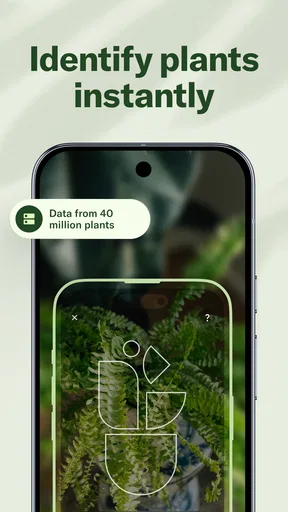
Adding plants to the app is as easy as pie. You can either search for them by name or use the handy plant identification feature, which is a lifesaver if you’re not sure what’s growing in your pot. Just snap a picture, and the app does its magic. Once your plant is identified, it’s added to your virtual garden with all its care details. For a mixed collection, I’d begin with the plants I most often forget, then fill in the easy-to-identify ones later. That keeps the app useful from the start without turning plant care into an admin project.
Identification is a starting point, not a reason to skip a closer look. If a photo suggests a likely match but the plant seems different in person, I’d check the leaf shape and growth habit before relying on its care plan. A wrong identification can make later advice less relevant, so it is worth correcting the entry rather than faithfully following a schedule for the wrong plant.
Make each care plan fit its spot
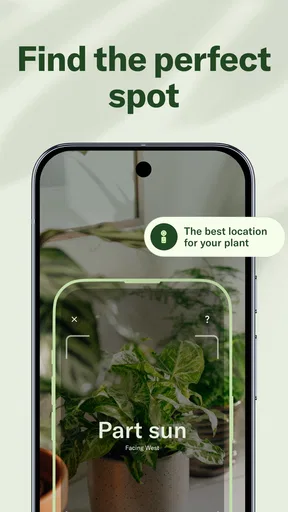
What I love is the level of detail you can input. You can specify the plant's location, pot size, and even lighting conditions. This personalization ensures that the care reminders are spot-on, tailored to each plant's specific needs. In day-to-day use, the location detail is especially handy: two plants of the same kind can behave differently if one sits beside a bright window and the other is farther into the room. I’d record where each pot really lives, not where I hope it will live, and revisit that information if I move furniture or shift plants for the season.
A useful habit is to take a quick look at the plant whenever you open a reminder. Feel the soil, notice whether the pot feels unusually light, and check for changes in the leaves. The app can keep the schedule visible, but those small observations help you avoid watering simply because a notification appeared. That distinction matters most for plants in different pot sizes or rooms, where a single routine may not suit every pot equally well.
Use reminders as a routine, not an order
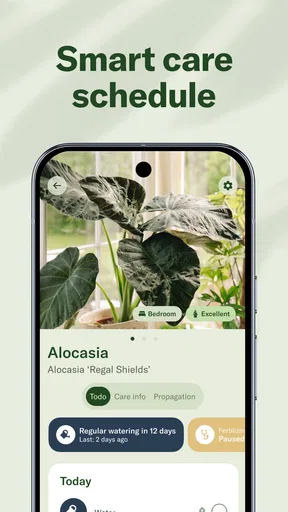
The app's core feature is the watering reminders, and let me tell you, they've saved more than a few of my leafy friends. Instead of guessing when to water, I get timely notifications that keep me on track. But that’s not all. Planta offers light and humidity reminders, fertilizing schedules, and even tips for repotting. It’s like having a full-time plant nanny. I see the notification as a cue to check in, then decide what the plant needs based on its actual condition.
That approach also helps with a realistic busy-day workflow. If I’m heading out in the morning and see a reminder, I can check the relevant pot while making coffee, water only if it needs it, and deal with any other task when I have time. If I’m away or sharing chores with someone else, a clear routine can make it easier to explain which plants need attention and which should be left alone. The app is most valuable when it reduces forgotten checks, not when it replaces judgment.
One feature I particularly appreciate is the seasonal reminders. As the weather changes, so do the care needs of your plants. The app adjusts its advice accordingly, helping you transition your care routine seamlessly from summer to winter. I would still pay attention to changes in the room itself: a heating season, a moved pot, or a stretch of unusually bright days can alter what a plant experiences. Seasonal guidance gives me a useful nudge to review habits, while the plant’s condition remains the final check.
When a plant looks unwell
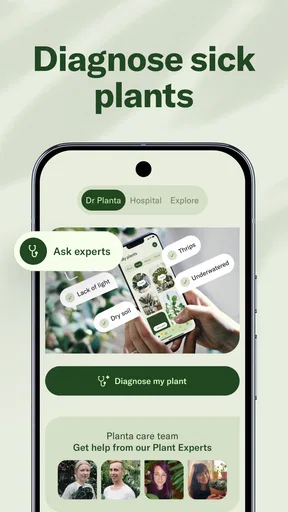
Ah, the dreaded yellow leaf or brown tip. We've all been there, staring at our plants in despair. Thankfully, Planta has a plant doctor feature. You can diagnose issues by comparing your plant’s symptoms to a database of common problems. It’s like having a plant encyclopedia with practical solutions at your fingertips. I’d use this to make a shortlist of possible causes, then compare the advice with recent changes in watering, light, or location. A symptom can have more than one explanation, so it is better as a troubleshooting aid than a definitive diagnosis.
For example, if a leaf changes after I move a pot, I’d note that timing before changing several parts of the care routine at once. Adjusting one thing and watching for a response makes it easier to tell whether the change helped. This is a small but useful trade-off: the app can make possible causes easier to consider, but the plant still needs patient observation, and serious or fast-moving problems may call for advice from an experienced grower.
Decide how much guidance you need
While the free version of the app is robust, there’s a premium option for those looking to take their plant care to the next level. Premium users get access to advanced plant care guides, personalized plant recommendations, and the ability to track unlimited plants. If you're a serious plant parent, it might be worth the investment. The app is free to start, while in-app purchases range from $7.99 to $49.99 per item. I’d begin with the free experience and decide whether the extra guidance or capacity solves a real need in my routine before paying.
That choice depends less on how enthusiastic someone is about plants and more on how they use the app. A small collection may not need extra capacity, while a larger garden can make broader tracking more attractive. Planta is rated for Everyone, and version 2.45.0 requires Android 10 or later. Those details make it straightforward to assess basic suitability, but the best test is whether its reminders and plant records fit how you already care for things at home.
There is also a trade-off in turning a hobby into a tracked routine. If every task starts to feel like an obligation, I’d keep only the plants and reminders that genuinely help and let the rest stay informal. A paper note or a simple calendar can be quicker for someone with a couple of familiar plants; Planta has more value when plant identification, separate schedules, and care information in one place matter more than keeping things minimal.
Bring in other people and learn as you go
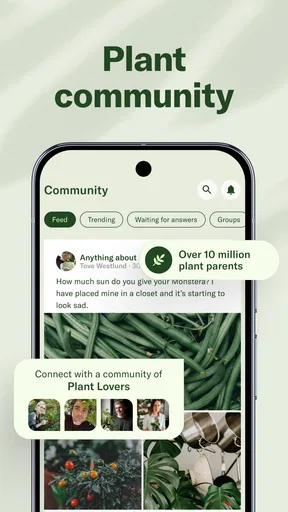
One of my favorite parts of the app is the community aspect. You can connect with other users, share tips, and even showcase your plant babies. There are also educational articles and guides, which are perfect for learning more about specific plant species or general gardening tips. I’d turn to the community when I want ideas or another perspective, while treating advice as something to compare with my plant’s conditions rather than a universal rule.
This can help when a plant’s care is being shared at home. A reminder gives everyone a common reference point, and a brief check of the plant before acting can prevent one person from watering immediately after someone else already did. The app’s records are useful in that kind of handoff because they make routines easier to discuss. Still, good coordination depends on people communicating; an app notification alone cannot tell another household member what has already happened that day.
Compared with keeping care notes in a phone calendar, Planta offers a more plant-centered way to organize identification, routines, and learning. A calendar can be simpler if all I want is a recurring nudge, and a general gardening book may be better for someone who prefers reading without notifications. Planta sits between those approaches: more tailored than a generic reminder, but still dependent on accurate entries and real-world checks. That balance is why I’d recommend it to someone building confidence with several houseplants, rather than to a person who wants a fully hands-off solution.
How the routine holds up
Overall, Planta: Plant & Garden Care is a fantastic tool for both novice and experienced plant parents. It takes the guesswork out of plant care and makes the process enjoyable and stress-free. Whether you’re nurturing a small succulent or managing a home jungle, this app is your go-to companion. For me, its best result is not a promise that every plant will thrive; it is a clearer routine that helps me notice what needs attention before I forget it.
So, if you’re tired of overwatering or underfeeding your plants, give Planta a try. It might just be the helping hand you need to turn your brown thumb green. Happy planting!
Where the flow can break
The biggest limitation is that a schedule can look more certain than plant care really is. A reminder cannot account perfectly for every change in soil, room conditions, or how recently a plant was watered. If I follow notifications without checking the pot, I can create the very problem I hoped to avoid. I’d especially avoid batching every watering task into one automatic session: checking each plant individually is slower, but it is a better safeguard against treating different pots as identical.
Another point to consider is the effort of keeping a digital garden accurate. If you move plants often, change their pots, or have trouble identifying them, the information needs occasional attention to stay useful. Someone with a few hardy plants and established habits may find that a basic calendar or a handwritten note is enough. Someone who enjoys learning, wants structured reminders, or regularly forgets which plant needs what is more likely to appreciate Planta’s extra organization.
I’d choose this app when I want one place to build a repeatable care routine and learn more as questions come up. I’d skip it if I dislike notifications, prefer spontaneous care, or expect a diagnosis tool to identify every problem with certainty. Used as a companion rather than an authority, it gives me a practical bridge from “I should check that plant” to a more informed next step—and that is a worthwhile role for a home gardening app.
Verdict
Strengths of Planta: AI Plant & Garden Care
- Intuitive interface for easy navigation.
- Comprehensive plant database for quick info.
- Personalized plant care reminders.
- Offline access to your plant library.
- Community forum for expert advice.
Limitations of Planta: AI Plant & Garden Care
- Limited features in the free version.
- Occasional app crashes reported.
- Requires subscription for full access.
- Some plant data might be missing.
- No integration with smart home devices.
Similar Picks in This Category
View All
Universal TV Remote Control
CodeMatics Media Solutions3.9

AlfredCamera Home Security app
Alfred Systems Inc.4.7

Planner 5D: AI Home Design
Planner 5D4.5

Universal Tv Remote-Cast to TV
One Music Player4.1

Zillow: Homes for Sale & Rent
Zillow Group4.8

99acres Buy/Rent/Sell Property
infoedge.com4.3
Frequently Asked Questions
What features does Planta: Plant & Garden Care offer?
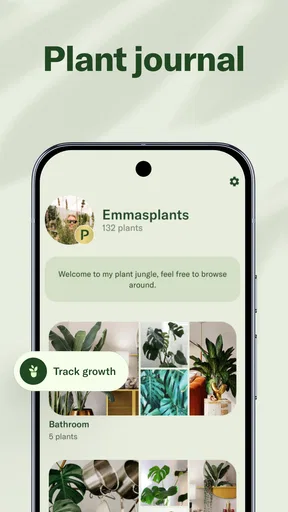
Planta: Plant & Garden Care offers a range of features designed to help you keep your plants healthy. These include care reminders, plant identification, light and water guidance, and disease identification. The app also provides a diary for tracking plant growth and a community forum for sharing tips with fellow plant enthusiasts.
Is Planta suitable for beginners in plant care?
Yes, Planta is ideal for beginners. It provides step-by-step guidance on how to care for a wide variety of plants. The app’s user-friendly interface and detailed instructions make it easy for those new to gardening to understand the needs of their plants and ensure they thrive.
Does Planta require a subscription for full access?
Planta offers both free and premium versions. While the free version includes basic features like watering reminders and plant identification, the premium subscription unlocks advanced features such as detailed plant care schedules, light meter, and plant disease identification. Users can decide based on their needs.
Can Planta help with identifying unknown plants?
Yes, Planta includes a plant identification feature. Users can take a photo of the plant they wish to identify, and the app will provide detailed information about it. This feature is particularly useful for those who have acquired plants without labels or are exploring new plant species.
Is the Planta app available for both Android and iOS devices?
Yes, Planta is available for download on both Android and iOS platforms. Users can easily find it in the Google Play Store and the Apple App Store. The app is optimized for both systems, ensuring a smooth user experience regardless of the device used.
